
Reviews & Reputation
How to Ask for Google Reviews After a Home Service Job

Ask every appropriate customer for an honest Google review with a neutral script, consistent timing, a direct link, and respectful reminders. No incentives, no gating, no star promises.
Introduction
Most owners of healthy-home service businesses already know that Google reviews matter. The harder part is asking for them without feeling pushy, and then doing it again on the next job, and the next one. Digital Growth Systems (DGS), a marketing technology, website, CRM and automation company in Greer, South Carolina, recommends a simple approach: ask every appropriate customer for an honest review, consistently, using the same neutral wording, with a direct link and a system that remembers to do it for you. No incentives. No gating. No promises about stars.
That's the whole answer. The rest of this guide is how to make it work in a crawlspace, a flooded basement, or a driveway in Upstate South Carolina where your technician is already thinking about the next job.
How Do You Ask for Google Reviews After a Job?
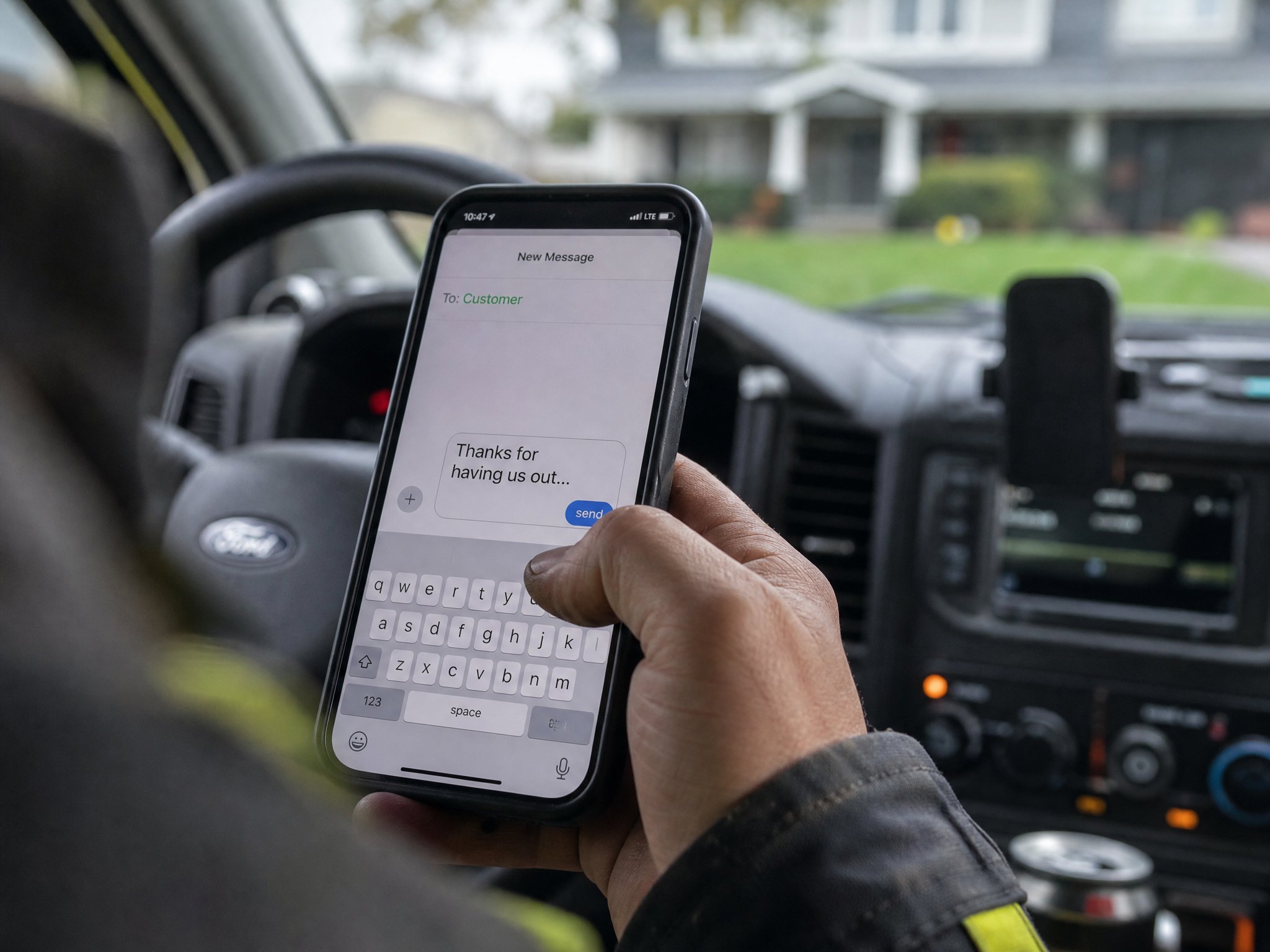
Ask in person first, then send the link while the work is still fresh. Back both up with a single script your whole team uses.
Say it in person
Your tech is standing there, the customer is looking at a dry basement or a clean air test result, and the mood is good. That's the moment. Something like: "Thanks for having us out. An honest Google review of your experience really helps us."
That's it. No speech, no pressure, no pitch. If the customer says sure, great. If they shrug, let it go. Respect matters more than the review.
Send the direct link
A verbal ask without a link dies in the truck. People forget by the time they pull up their phone. So the text or email should land right after the ask, with a link that opens the review box on Google's own review guidance describes. One click. Nobody should have to hunt for your listing or guess which "Smith Waterproofing" is yours.
Keep one script
Three technicians with three different asks gives you three different results and zero ability to tell what's working. Pick one script and use it everywhere. A good one covers:
A thank-you that sounds like a person wrote it
One plain sentence asking for an honest review
The direct link
A line letting the customer know they can ignore it or reply to stop messages
Short wins. Everything else is noise.
When Is the Right Time to Ask?
Soon after the customer has seen the result, which differs by trade. Not a week later, when they've moved on.
After completion or payment
For most jobs, the best trigger is completion or payment, whichever your team can capture cleanly. A job marked closed in your CRM is a natural cue. DGS doesn't set a universal rule here, and honestly nobody should pretend there is one. Pick a consistent trigger and stick to it.
Urgent repair trades
Water damage restoration, burst-pipe cleanup, an emergency sump failure. The customer's relief is the peak, and it fades quickly. Ask when the crew packs up or when the final invoice clears. Just don't ask mid-chaos while the dehumidifiers are still running and the homeowner is on the phone with their insurance adjuster.
Results-over-time trades
Pest control, radon mitigation, water treatment. The proof arrives later. A hypothetical example: a homeowner in Greer gets a whole-home water filter installed on Tuesday. Do they know it's working on Tuesday? Maybe not. Waiting until after the first retest, or a follow-up check-in, gives them something real to write about.
Trade (hypothetical timing) | Reasonable trigger |
|---|---|
Water damage restoration | Job closeout or final payment |
Mold remediation | After clearance or final walkthrough |
Radon testing/mitigation | After results or post-install test are delivered |
Pest control | After a follow-up visit confirms results |
Water treatment | After install plus a short check-in |
Treat that as a starting point, not a rulebook. Your crew knows your customers better than any chart.
What Makes a Review Request Easy to Complete?
Fewer steps. Every extra tap loses someone, even a happy someone.
One-click Google link
Pull your review link from your Google Business Profile, which needs to be verified and managed by an owner or manager before you can reply to reviews and handle your listing properly. Paste that link into your templates once. Then stop touching it.
QR code option
A QR code on a leave-behind card or an invoice can open the review screen on a phone, which suits in-person moments. DGS's documentation doesn't walk through QR generation, so use whatever tool your Google Business Profile dashboard offers. Keep it as a backup, though. A text link usually beats asking someone to aim a camera at a card while holding a clipboard.
Text or email delivery
Text tends to get seen faster. Email suits customers who prefer it or whose job involved a longer paper trail, like an estimate and a signed contract. With campaign templates in DGS, you can customize ready-made wording and send by connected channels. Calling, texting, email and AI usage terms are confirmed before activation, so ask about them at the demo.
Which Customers Should You Ask?
Customers who genuinely received your services and have not opted out. Use consistent eligibility regardless of whether their feedback is positive or negative.
Ask every eligible customer
Ask consistently after completed jobs. Do not select customers based on satisfaction or exclude those who complained. Genuine experiences make a review profile useful.
Skip the pre-screen
Some businesses send a "rate us 1 to 10" first, then only invite the 8s, 9s and 10s to Google. Don't. It adds a step, it feels like a quiz, and it's review gating, which Google's policies discourage. Ask everyone appropriate in the same way. Address complaints personally through a separate support process, while keeping the same public review opportunity available.
Write a Neutral Request Template
Neutral means the wording doesn't steer, bribe or coach.
Text message
Hi [Name], thanks for having [Company] out today. An honest Google review of your experience would really help us. Here's the link: [link]. Reply STOP to opt out.
Same idea, slightly warmer, with a plain subject line like "Thanks from [Company]." Skip the keyword-stuffed script that tells people to write "tankless water heater installation" or "mold remediation Greer SC." Let them describe the job in their own words. A genuine review reads like a human wrote it, because one did.
Technician script
"Thanks for having us out. An honest Google review of your experience really helps us. I'll text you a link right now." Say it the same way every time.
What Do Google's Current Policies Allow?
Honest requests, yes. Manipulation, no. Google's published rules live in its Business Profile help pages, and they change, so read them directly rather than trusting a blog (including this one). DGS doesn't give legal advice, so treat this as a practical summary.
No incentives
No discounts, gift cards, free add-ons or raffle entries in exchange for reviews. Even "10% off your next service if you leave five stars" is a problem.
No review gating
Don't filter who gets the public link based on how they feel. Everyone appropriate gets the same ask.
Fake review rules
No reviews from employees, family members or friends pretending to be customers, and none written on someone's behalf. Google's profile integrity guidance is worth a skim, since violations can lead to removed reviews or suspended listings. Also check Google's rules for service-area businesses if you travel to customers instead of hosting them at an office.
How Do You Set Up Consistent Eligibility and Timing?
Decide the rule once, write it down, then let your CRM enforce it. For example: the job is marked complete and the customer has not opted out; satisfaction or an open complaint does not determine eligibility. That's your trigger.
DGS's All-In-One Inbox and CRM uses stages, notes, tasks and team ownership, so "Completed" can mean something concrete rather than a gut feeling. Universal integration isn't promised, so check which channels connect when you book a demo.
How Should You Send Respectful Reminders?
One nudge, maybe two, spaced out. Then quit.
Good reminders are short and easy to ignore. Bad ones guilt-trip. Automated follow-up sequences can stop on reply or opt-out where configured, which matters a lot. Someone who texted "no thanks" and then gets a third reminder won't be writing you anything nice.
Where Should Private Feedback Go?
Somewhere separate from the review request. Customers with a complaint will find you anyway, through a call, a reply to your text, or a note to the office.
Log it in your CRM as a note, assign a task, give it an owner. A thoughtful response to private feedback sometimes turns a bad week into a loyal customer. But keep this channel apart from the public ask. Don't route unhappy people away from Google. Just don't hide the door for them either.
How Can Your CRM Automate the Request?
Automation handles the reminder, not the relationship. If your ask is clunky, a robot will deliver the clunk faster.
A workable setup looks like this:
A job moves to "Completed" in the CRM.
A neutral text template goes out at your chosen time.
If the customer replies or opts out, the sequence stops.
Any negative reply creates a task for a team member.
DGS's review funnel is built around that pattern, and its campaign templates are customizable but aren't unlimited agency labor. No guaranteed stars. No guaranteed volume.
What Mistakes Should You Avoid?
Most review programs fail in boring ways.
Offering rewards, even small ones
Sending the request weeks later
Asking only the customers you're sure will love you
Writing different scripts for every tech
Ignoring opt-outs
Promising or hinting at a star rating
And a quieter one: asking once, giving up, and calling reviews "not worth it."
How Do You Respond to Reviews After They Post?
Quickly, politely, in your own voice. Thank the customer, mention something specific if you can, keep it short. Don't paste the same reply under every review. People notice. Use CRM tasks to assign ownership so replies don't depend on whoever remembers.
What Should You Do When an Unhappy Customer Posts a Review?
Breathe first. Then reply without arguing, acknowledge the concern, and take the details offline. Log the issue in your CRM, assign a follow-up, and have a real person call.
If a review looks fake or violates policy, flag it through Google's process rather than begging the customer to delete it. A few critical reviews won't sink you. A defensive reply might.
FAQ
Can I offer a discount for a review? No. Incentives are prohibited.
Can I only send the link to happy customers? Don't pre-screen by sentiment. Ask appropriate customers consistently.
Will automated requests guarantee more reviews or higher rankings? No tool can promise that. Automation helps you ask consistently. Results depend on your service, your customers and your market.
Should I coach customers on what to write? No. Let them use their own words.
What if a customer replies "stop"? Honor it immediately.
Conclusion
Asking for reviews well is mostly discipline: one honest ask, one direct link, one script, one reliable follow-up. A functional website captures the inquiry, the CRM tracks the job, and the campaign goes out when the work is done. Those pieces fit together in DGS's seven core connected tools at $297/month (details on the pricing page).
If you'd like to see how that looks for a mold, water, radon or pest business in Greer or anywhere else, book a demo and we'll walk through it with you.
Want these workflows set up for your business?
The Digital Growth System includes missed-call text-back, estimate follow-up, and honest review requests, one plan, $297/month.
Keep reading
Reviews & Reputation
Consistent, honest review requests
Reviews matter for local search and trust, but only when they're honest. Here's how to ask for reviews consistently without gaming the system.
Lead Follow-Up
Missed-call follow-up basics
Most healthy-home service companies miss calls every day, not because they're disorganized, but because they're on a job. Here's how to think about follow-up so those calls don't disappear.